CodiEditor
— Web Programming Environment
A browser-based IDE for learning programming through visual blocks. Students assemble a program from drag-and-drop blocks, see the corresponding MicroPython code update in real time, and run it directly on a connected CodiBit board — all within a single interface.
Metadata
Tech Stack
Interface
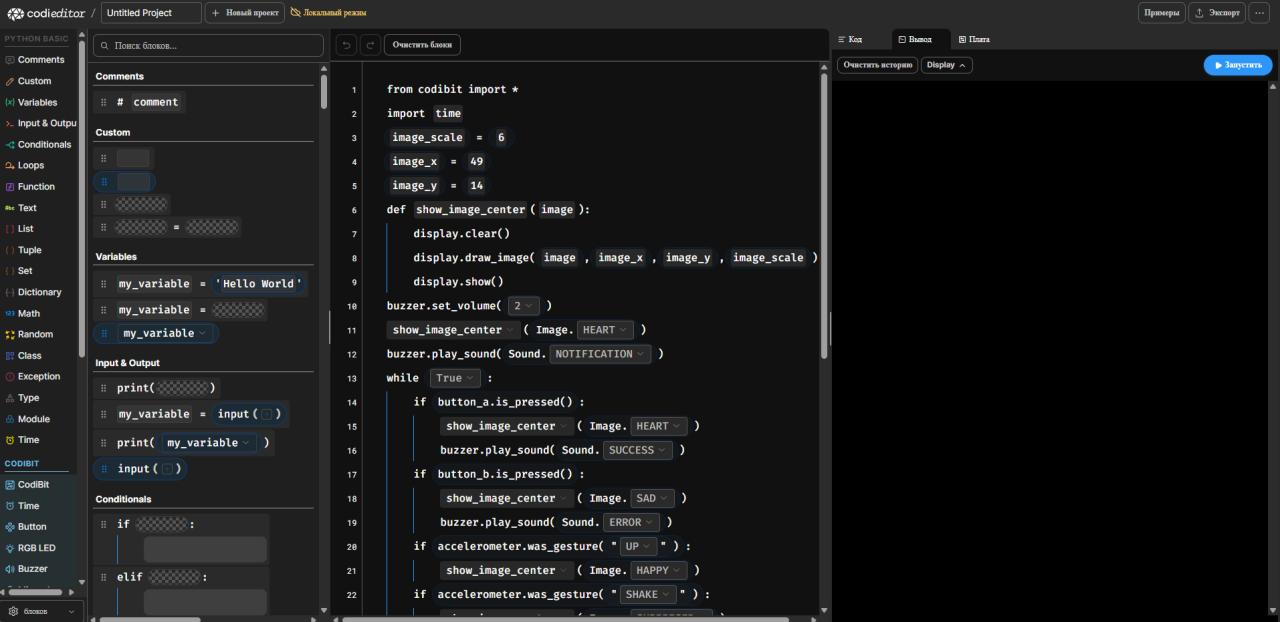
Key Features
- check_circle Drag-and-drop block editor
- check_circle Live MicroPython code view synced to blocks
- check_circle Direct code execution on CodiBit board
- check_circle Output console for program results
- check_circle CodiBit-specific block categories (Button, Display, Buzzer, RGB LED, Accelerometer)
- check_circle Standard Python blocks (Variables, Loops, Conditionals, Functions, Math)
- check_circle Local and cloud project modes
How It Works
CodiEditor lowers the barrier for students entering programming. The block layer handles syntax; the code view teaches what the blocks actually mean. When the student is ready, they can write Python directly — the two views stay in sync.
[INIT] CodiEditor web environment loaded.
[OK] Block palette ready — 12 categories, CodiBit extensions active.
[OK] MicroPython transpiler initialised.
[OK] Board connection: CodiBit detected via USB.
[INFO] CodiPlay educational platform · Abu Dhabi, UAE
[ROLE] Robotics Engineer — development & platform improvement.
> Session active_